How to add an email address to your Windscribe account

Winder S
Oct 17, 2025

If you want to add an email address to your Windscribe account, here are the steps to make it easy for you:
- Log into the Windscribe website and open the Account tab of My Account
- In the Account Information card, click Add on the Email row (if your account already has an email you want to change, click Edit, the pencil icon, instead)
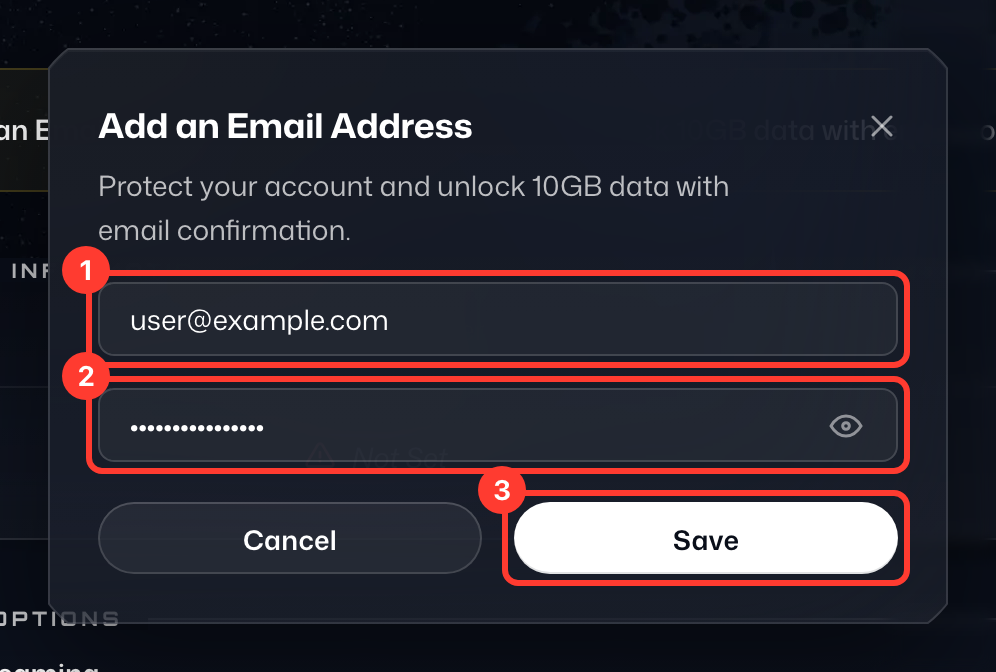
- In the Add an Email Address window, enter the email address you would like to use under New Email Address (1), confirm it by entering your Current password (2) for security, and click Save (3)
- Important: Check your inbox and spam folders for an email containing a confirmation link. Follow the instructions in this email to confirm the address and you will be all set. Until then, the Email row marks the address as Unconfirmed; click Resend next to it if you need a new confirmation email.